
Quick answer: Common resin 3D printing problems include failed prints (the part drops off the build plate or supports snap), “noodling” (stringy resin strands, with the part separating into ribbons), layer separation (delamination or layer shift) and post-print cracking. The main causes are high peel forces, insufficient supports, cold resin and incorrect exposure. The core fixes: tilt the part 20–45°, keep resin at 25–28 °C, add supports in the right places, and hollow parts with drain holes. Done correctly, the failure rate can be kept below 5%.
Printing resin at home or in a small workshop, have you ever opened the machine to find an empty build plate and a slab of cured resin stuck to the vat? Or had a print crack along its body a few days later? These are problems CT3D engineers encounter and solve every day. This article takes a “diagnostic” approach: symptoms, root causes, fixes and prevention. For an overview of services, materials and prices, see our pillar article on resin 3D printing.
Why do resin 3D printing problems happen? Understand peel force before fixing anything
Most DLP and LCD resin printers (and many SLA machines) print “upside down”: the build plate sits above and dips into the resin vat. Each layer is cured at the bottom of the vat, sandwiched between the build plate and a transparent film (FEP). After curing, the build plate must pull the new layer away from the vat floor. This creates peel force – much like peeling a piece of tape off glass.
Peel force increases with:
- Cross-sectional area of the layer: the larger the layer, the greater the suction.
- Lift speed: fast lifts produce sharp jerks.
- Resin viscosity: thick resin (because it is cold or an engineering resin) struggles to flow back into the gap, increasing suction.
- FEP film tension: both slack and over-tight film affect layer peeling.
The part and its supports must be strong enough to withstand this force at every layer. When they can’t, failures occur. Almost every major failure comes down to one question: is the peel force greater than the part’s adhesion?
Quick diagnostic table for resin printing problems
| Problem | Symptoms | Common causes | Fix |
|---|---|---|---|
| Failed print / part detached | Empty build plate, cured slab stuck to the vat | Underexposed bottom layers, unleveled plate, oversized cross-section | Increase bottom exposure, level the plate, tilt the part 20–45° |
| Broken supports | Sections of the part missing, supports snapped midway | Thin, sparse supports, missed low points | Increase support diameter and density, support every “island” |
| “Noodling” | Part formed of strands and ribbons, ragged surface | Layers stretched, cold resin, underexposure | Keep resin at 25–28 °C, increase exposure time, reduce lift speed |
| Layer separation / delamination | Horizontal lines, part split in two | Excessive peel force, sudden increase in cross-section | Reorient to reduce area per layer, hollow the part |
| Cupping (suction cup effect) | Holes blown in hollow parts, internal cracks | Hollow part without drain holes creates a vacuum | Add drain and vent holes |
| Post-print cracking | Hairline cracks after hours to days | Trapped uncured resin, over-curing, shrinkage stress | Clean hollow interiors, cure for the correct time, keep wall thickness uniform |
| Dimensional growth | Holes too small, features larger than the file | Overexposure, light bleed | Reduce exposure, compensate tolerances |
| Visible layer lines | Horizontal banding on curved surfaces | Thick layers, poor orientation angle | Reduce layer height, change the part angle |
Source: CT3D resin production experience (part tilt 20–45°, resin at 25–28 °C, failure rate below 5%).
In-depth analysis of each resin printing problem
Failed prints: why does the part fall off the build plate?
Failed prints are the most costly problem, since you lose the whole batch and the resin. There are two types. Type 1: the part never adheres to the plate and ends up entirely on the vat floor. Common causes are underexposed bottom layers, an unleveled build plate or an overly smooth plate surface. Type 2: the part adheres but falls off midway. Here the cause is supports that can’t withstand peel forces as the cross-sectional area grows.
Worked example: a 100 × 100 mm flat plate placed parallel to the vat floor has a layer area of 10,000 mm². Tilted at 45°, each layer’s cross-section becomes just a narrow strip: 100 mm wide times a few millimeters of cross-cut thickness, i.e. only a few hundred mm². Peel force drops by a factor of tens. That is why CT3D almost always tilts parts 20–45° instead of laying them flat.
What is “noodling,” and why does cold resin cause it?
“Noodling” is shop-floor slang for prints that come out as thin strands and ribbons stuck together, like noodles. Essentially, the layers don’t cure firmly enough or are stretched before they can bond. The most common cause in Vietnam is temperature: when the machine room is air-conditioned or printing runs overnight, the resin thickens, curing slows down and interlayer adhesion weakens. Very cold resin also flows slowly and fails to fill the area just peeled, leaving voids.
How to fix it: keep resin stable at 25–28 °C (use a heated enclosure or warm the resin before pouring), stir resin thoroughly before printing as pigments and additives can settle, increase exposure time slightly and reduce lift speed.
Layer separation and layer shift: machine or file problem?
Layer separation typically occurs exactly where the cross-section changes abruptly – for example, where a statue’s torso widens into the shoulders. Peel force spikes at that layer, pulling the part out of alignment or splitting it. This is mainly a file and orientation issue. Only if tears appear randomly on every print should you suspect the machine: a loose Z axis, worn FEP film or loose build plate screws.
Post-print cracking: the delayed failure
Many prints look perfect but crack a few days later. Common causes: (1) the part was hollowed but liquid resin inside wasn’t washed out; this resin continues to react slowly and shrink, building pressure that cracks the shell; (2) excessive UV curing makes the material brittle; (3) uneven thick and thin walls shrink at different rates. Prevention: design uniform wall thickness, include drain holes large enough for thorough cleaning, and cure for the correct time for each resin. For wall thickness and drain holes, see our article on designing files for resin printing.
Dimensional errors: tight holes, oversized pins
UV light doesn’t stop precisely at the edge of a pixel or laser path – it bleeds slightly. The result: small holes shrink, small pins grow, and fit clearances close up. The deviation depends on the resin and exposure settings. According to CT3D documentation, SLA achieves about ±0.05–0.1 mm and DLP about ±0.03–0.08 mm with properly tuned settings. For mating parts, print a test sample to measure and compensate tolerances before printing in volume. The differences between technologies are explained in our article SLA vs DLP vs LCD: what’s the difference.
Failure-control parameters used by CT3D
| Factor | Recommendation | Effect if wrong |
|---|---|---|
| Resin temperature | 25–28 °C | Too cold: noodling, layer separation. Too hot: resin degrades faster |
| Part orientation | Tilted 20–45° | Laid flat: high peel force, failed prints |
| Layer height | 25–100 microns depending on the part | Too thick: layer lines, poor adhesion; too thin: slow |
| Hollowing | With drain and vent holes | No holes: cupping, cracking |
| Supports | Support every low point, island and overhanging edge | Insufficient: missing sections, distortion |
Source: CT3D resin printing technical procedures.
For general principles of support structures, read our article what are supports in 3D printing.
Pre-print checklist to prevent failures
- Check that the file is watertight (manifold), has no faulty faces, and no walls thinner than the resin can handle.
- Tilt the part 20–45° and avoid sudden large cross-sections.
- Place supports at every local lowest point (“island”) – these points are printed first with nothing beneath them.
- Hollow large parts and add at least two holes: a resin drain hole near the build plate and a vent hole far from it.
- Stir the resin thoroughly and check that it is at 25–28 °C.
- Check that the FEP film is not punctured or cloudy and has no leftover cured resin from the previous print.
- Level the build plate and tighten its screws.
- Verify that exposure settings match the resin type.
When should you use a print service instead of printing yourself?
DIY resin printing makes sense for small, simple parts. For large parts, engineering resins (clear, heat-resistant, tough, castable) or when assembly tolerances matter, the cost of repeated failed prints can exceed the cost of outsourcing. Raw resin on the market costs about 0.8–3 million VND/kg (≈ US$31–115/kg; indicative Ho Chi Minh City market rates for 2026, not CT3D’s prices); a large part that fails midway can waste hundreds of grams of resin and many machine hours.
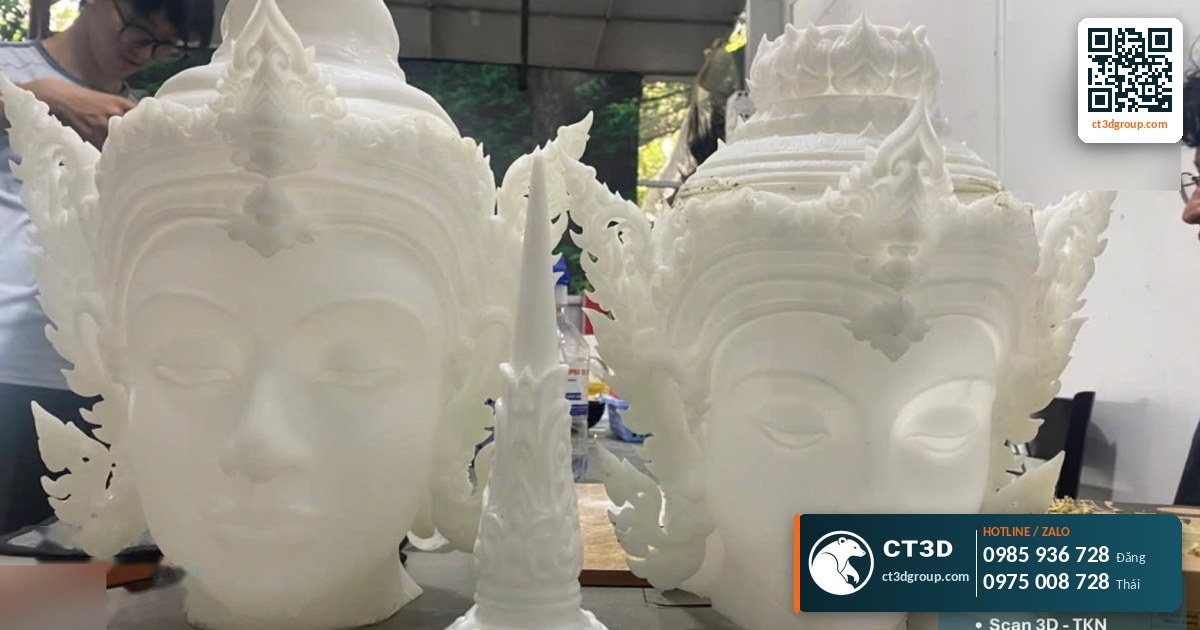
Real-world case: CT3D has printed a 1 m tall Catholic statue using SLA. At this scale, a single torn layer is enough to ruin an entire section. Engineers have to carefully plan the orientation, sectioning, hollowing and drain holes right from the file-preparation stage. This approach keeps the failure rate below 5%.
After a successful print, the next steps are washing, curing and finishing. See the detailed guide in our article on resin print post-processing. If you need industrial large-format resin printing, see our large-format SLA 3D printing service. Full information on technologies, materials and prices is available in our article on custom resin 3D printing.
Frequently asked questions about resin 3D printing problems
Why does my resin print fall off the build plate?
Usually because of underexposed bottom layers, an unleveled build plate, or supports that can’t withstand peel force at large cross-sections. Increase bottom exposure, level the plate and tilt the part 20–45°.
What is “noodling” in resin printing?
It is when a print comes out as thin strands and ribbons because layers don’t cure firmly enough or are stretched, typically because the resin is too cold. Keep resin at 25–28 °C and slightly increase exposure time.
Why do resin prints crack after a few days?
Because liquid resin is trapped inside a hollow cavity, the part was over-cured with UV, or walls are unevenly thick. You need large enough drain holes, thorough internal cleaning and the correct curing time.
How does room temperature affect resin printing?
Cold resin thickens, cures slowly and bonds poorly between layers, easily causing layer separation and noodling. CT3D keeps resin within 25–28 °C.
What is a normal failure rate for resin printing?
With a process that controls orientation, temperature and supports, CT3D keeps its resin print failure rate below 5%.
Video from the CT3D workshop
Watch the video Ultra-smooth prototypes with SLA 3D printing in Ho Chi Minh City by CT3D to get a clearer picture of our process and product quality. More videos are available on our channel Che Tao Vlog – CT3D.
Contact CT3D – send your file, get a fast quote
Whether you have a 3D file, a 2D drawing, photos or just an idea, you can send it to CT3D. Our engineers will check the file, recommend the right technology and material, and send you a quote with a delivery lead time.
- Email: [email protected] – [email protected]
- Hotline / Zalo: +84 975 008 728 (Mr. Thai) – +84 985 936 728 (Mr. Dang), or use our contact form
- Head office: Binh Duong.
- Workshops in Ho Chi Minh City: Linh Trung (Thu Duc), Tam Binh (Thu Duc), former District 6.
- Other workshops and drop-off points: Can Tho, Da Nang, Bien Hoa, Ba Ria – Vung Tau, Hanoi, Hai Duong, Hai Phong. Nationwide delivery.
- Website: ct3dgroup.com – in3d.edu.vn
CT3D – 3D design & prototyping: 3D printing, 3D scanning, reverse engineering, silicone mold making, painting and finishing, CNC machining, composite fabrication, plus 3D printers and 3D printing materials.
Danh sách cửa hàng:
CT3D là đơn vị cung cấp trọn gói các dịch vụ thiết kế và sản xuất theo yêu cầu tại TP.HCM và khu vực lân cận (Bình Dương, Đồng Nai, Long An…). Với năng lực khép kín từ thiết kế 3D, in 3D (FDM, resin/SLA, SLS, in 3D kim loại), scan 3D – thiết kế ngược, làm khuôn, đúc composite – poly resin – poly stone đến gia công CNC và sơn màu hoàn thiện, CT3D đồng hành cùng khách hàng qua toàn bộ quy trình – từ ý tưởng, bản vẽ hay sản phẩm mẫu đến thành phẩm hoàn chỉnh. Dù bạn cần tạo mẫu nhanh, sản xuất số lượng, chế tác tượng – mô hình – quà tặng hay linh kiện kỹ thuật, đội ngũ CT3D sẽ tư vấn công nghệ và vật liệu phù hợp, đảm bảo sản phẩm sắc nét, đúng yêu cầu và tối ưu chi phí. Khách hàng tại TP.HCM và vùng lân cận có thể trao đổi trực tiếp, gửi file online và nhận sản phẩm thuận tiện, hỗ trợ cả đơn gấp lẫn dự án số lượng.
CT3D cung cấp trọn gói các dịch vụ thiết kế và sản xuất theo yêu cầu, phục vụ khách hàng tại Hà Nội và các tỉnh lân cận (Bắc Ninh, Hưng Yên, Hải Phòng, Vĩnh Phúc…). Với năng lực khép kín từ thiết kế 3D, in 3D (FDM, resin/SLA, SLS, in 3D kim loại), scan 3D – thiết kế ngược, làm khuôn, đúc composite – poly resin – poly stone đến gia công CNC và sơn màu hoàn thiện, CT3D đồng hành cùng khách hàng qua toàn bộ quy trình – từ ý tưởng, bản vẽ hay sản phẩm mẫu đến thành phẩm hoàn chỉnh. Quy trình làm việc thuận tiện: bạn gửi file 3D hoặc mô tả ý tưởng qua online, đội ngũ CT3D tư vấn công nghệ – vật liệu, báo giá nhanh và giao hàng tận nơi tại Hà Nội. Dù bạn cần tạo mẫu nhanh, sản xuất số lượng, chế tác tượng – mô hình – quà tặng hay linh kiện kỹ thuật, CT3D đều đáp ứng với sản phẩm sắc nét, đúng yêu cầu và tối ưu chi phí.

