
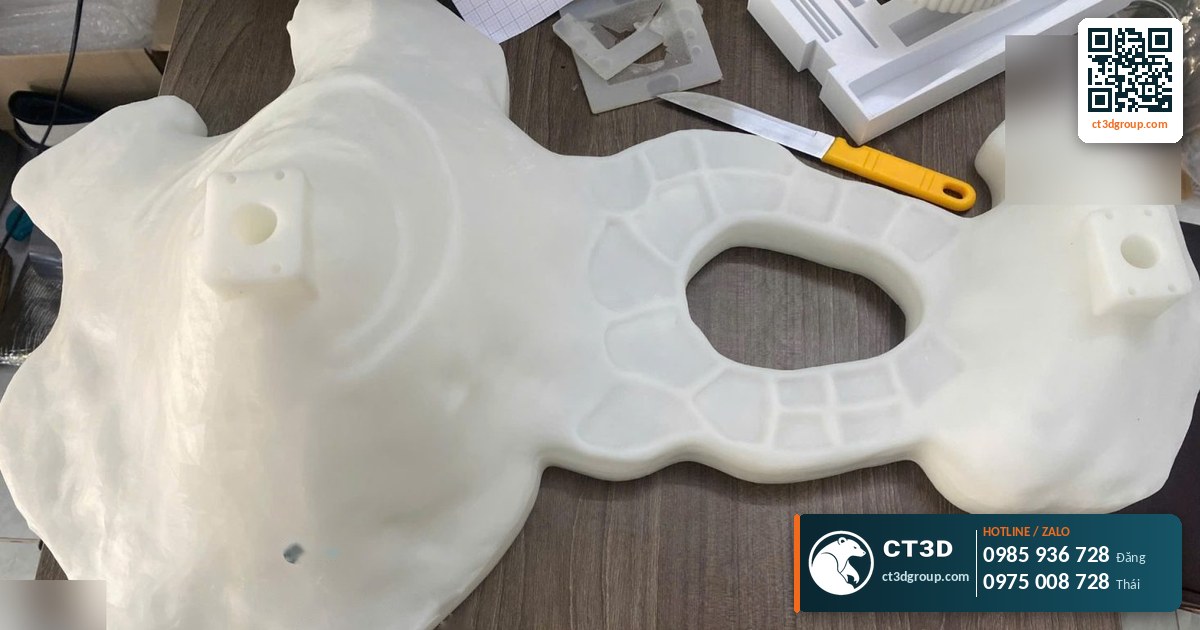
Quick answer: A well-designed resin print file gets four things right: a minimum wall thickness of about 1 mm for typical parts (2–3 mm for the shell of large hollowed models); hollowing of large solid models to cut resin use and peel forces; at least 2 drain holes of about 3 mm diameter or more, placed low and far apart; and a fit clearance of about 0.1–0.3 mm, because SLA has a tolerance of ±0.05–0.1 mm and DLP ±0.03–0.08 mm. Get these right in your resin print design and your parts will crack less, fail less, and can be several times lighter.
Many files sent to CT3D look perfect on screen but fail in resin: walls that are too thin warp, large solid blocks tear between layers, hollow models without drain holes crack after a few days, and pins do not fit their holes. Most of these problems can be solved at the design stage. This article is written for modelers, product design engineers and students, and takes a deep dive into design rules for resin printing (DfAM – design for additive manufacturing). For an overview of services and materials, see our pillar article on resin 3D printing.
Why Does Resin Print Design Need Its Own Rules?
Resin printing differs from FDM in three ways that change the design rules:
- Peel forces: each layer cures at the bottom of the vat and is then pulled away. The larger the cross-section, the stronger the pull. Large solid blocks are the main cause of layer tearing and failed prints.
- Trapped liquid resin: any enclosed cavity in the model fills up with liquid resin. Without drain holes, the resin is trapped inside and causes cracking later.
- Shrinkage and light bleed: resin shrinks as it cures and during UV post-curing; light bleeds slightly beyond the exposed area, so small holes come out smaller and small pins come out larger.
So a resin print file must be designed with walls thick enough but not too thick, large models hollowed, a path for the resin to drain, and compensated dimensions for mating parts. The file must also be watertight with no mesh errors – see our article on what an STL file is.
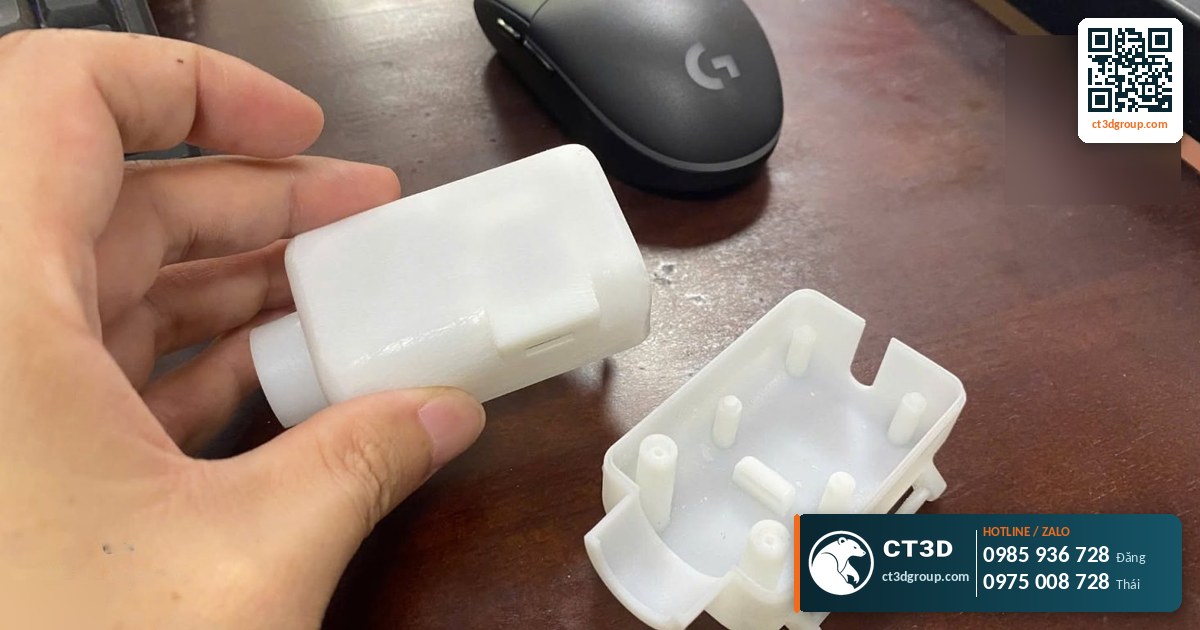
Recommended Design Parameters for Resin Printing
| Geometric feature | Recommended value | Notes |
|---|---|---|
| Supported wall (connected at both ends) | From about 0.6–1 mm | Thinner walls tend to warp during curing |
| Unsupported wall (free at one end) | From about 1 mm | The taller the wall, the thicker it should be |
| Shell when hollowed | 2–3 mm (large models can be thicker) | Balance between stiffness and resin savings |
| Drain holes | From about 3 mm; 5–10 mm for large models | At least 2 holes: resin drain and air vent |
| Embossed / engraved details (text, patterns) | From about 0.2–0.3 mm | Machines can resolve details down to 0.05 mm, but leave a margin |
| Small posts and pins | Diameter from about 0.8–1 mm | Thinner ones break easily during washing and support removal |
| Fit clearance | 0.1–0.3 mm depending on fit type | Print a test piece before a production run |
| Layer thickness | 25–100 microns | Affects surface smoothness and print time |
Sources: tolerances, layer thickness and 0.05 mm detail from CT3D technical documentation; design values are common industry recommendations for resin printing and should be adjusted for the specific resin.
Each Design Rule in Depth
How thick should walls be for resin printing?
Walls that are too thin face three risks: warping during UV curing (uneven resin shrinkage), breaking during washing or support removal, and failing to print at all if they are thinner than the machine can resolve. Walls that are too thick cause the opposite problems: wasted resin, larger cross-sections that increase peel forces, and higher shrinkage that builds internal stress.
The practical rule: load-bearing or free-standing walls should be about 1 mm or more; hollow shells 2–3 mm. Just as important is uniform wall thickness. A model that is 1 mm in one place and 8 mm in another will shrink unevenly and is prone to cracking at the transition. If the thickness must change, transition gradually with a fillet instead of an abrupt step.
Hollowing resin prints: benefits and a worked example
Example: a solid 50 mm cube has a volume of 50 × 50 × 50 = 125,000 mm³ = 125 cm³. If it is hollowed with a 2 mm shell, the cavity is a 46 mm cube: 46 × 46 × 46 ≈ 97,336 mm³ ≈ 97.3 cm³. The resin volume drops to about 125 − 97.3 = 27.7 cm³, a reduction of about 78%. With a resin density of about 1.1 g/cm³, the solid cube weighs about 137 g, while the hollow one weighs only about 30 g.
At 2026 market prices in Ho Chi Minh City, raw resin costs about 0.8–3 million VND/kg (≈ US$31–115/kg; not CT3D prices). Saving more than 100 g of resin on a small block is already significant; for large statues, the savings reach several kilograms. Beyond material cost, hollowing also reduces the cross-section of each layer, lowering peel forces and the risk of layer tearing and shrinkage cracks.
When should you not hollow? Small parts under a few centimeters, load-bearing parts that need maximum stiffness, or clear models you want to see through evenly (the cavity would be visible).
Where should resin drain holes go, and how many do you need?
A hollow model printed upside down behaves like an inverted cup: as the build plate rises, the sealed cavity creates a vacuum, known as the cupping effect. The result: a punctured shell, layer tearing, or a bulging shell. Therefore:
- At least 2 holes: one for resin to drain out and one to let air in. With only one hole, resin drains very slowly, like an upturned bottle.
- Location: place one hole close to the build plate (the first printed point of the cavity) to break the vacuum early, and the other on the opposite side. Prefer hidden areas such as the base or back of a statue.
- Size: from about 3 mm for small models; 5–10 mm for large models so the interior can be easily flushed with IPA.
- Plugging holes after printing: use pre-printed plugs of the same size, or fill with resin, UV cure, and sand flush before painting.
Poor drainage is a common cause of cracking after printing – see our articles on common resin 3D printing problems and on flushing hollow interiors in resin print post-processing.
Fit tolerances for resin printing: how much clearance?
According to CT3D documentation, SLA has a tolerance of about ±0.05–0.1 mm and DLP about ±0.03–0.08 mm. If you design a 5.00 mm pin for a 5.00 mm hole, in the worst case the pin grows by 0.1 mm and the hole shrinks by 0.1 mm: a 0.2 mm interference, and the parts will not assemble. That is why you need clearance.
| Fit type | Suggested clearance (on diameter) | Example |
|---|---|---|
| Press fit | About 0–0.1 mm | Permanent locating pins |
| Sliding fit, removable | About 0.15–0.2 mm | Box lids, slide rails |
| Loose fit, free rotation | About 0.25–0.3 mm or more | Hinges, rotating shafts |
Sources: tolerances from CT3D documentation; clearances are common reference values – print a test piece to confirm for your resin and print orientation.
In addition, vertical holes parallel to the Z axis usually come out rounder than horizontal holes (horizontal holes tend to become slightly oval due to layering). Holes with tight tolerances should be printed and then reamed. Our article on 3D printing accuracy and tolerances covers fit design across multiple technologies.
Overhangs, large flat surfaces and support placement
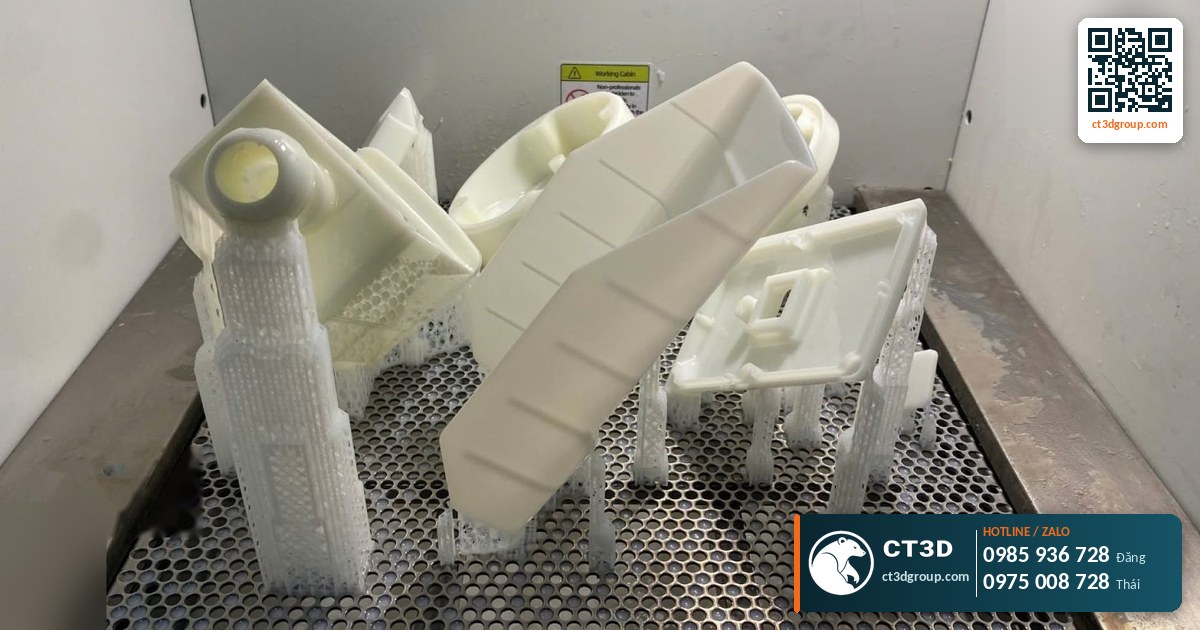
Resin still needs supports for overhangs and local lowest points (“islands”). When designing, you should: avoid large flat surfaces parallel to the vat floor (engineers will tilt the model 20–45°); keep important cosmetic details on the side without supports; and add chamfers or fillets to overhanging edges to reduce the number of support points. See also our article on 3D printing supports.
Common Design Mistakes and How to Fix Them
- Non-manifold files, flipped normals: the slicer misreads inside and outside. Fix with a mesh repair tool and re-export the STL.
- Solid blocks that are too large: cause layer tearing and waste resin. Hollow with a 2–3 mm shell and add drain holes.
- Sealed cavities without holes: cause cupping and cracking. Add at least 2 holes.
- Embossed text that is too small: text below about 0.2 mm is easily lost during sanding. Increase the text height or use engraved text.
- Pins without clearance: parts will not assemble. Allow 0.1–0.3 mm and print a test piece.
- Model larger than the build volume: split it into sections with locating keys. CT3D prints large-format resin up to 800×800×500 mm, reducing the number of joints – see our article on large-format resin 3D printing.
File Checklist Before Sending to CT3D
- STL/OBJ/3MF file (or STEP if edits are needed), in millimeters, at true scale.
- Watertight mesh, no faulty faces, no self-intersections.
- Minimum wall thickness of about 1 mm, uniform throughout.
- Large models hollowed (or a note asking our engineers to hollow them).
- At least 2 drain holes in hidden locations.
- Fit clearances compensated by 0.1–0.3 mm.
- Cosmetic surfaces that must be kept free of supports are noted.
- Desired resin specified: standard, clear, tough, high-temperature or castable.
If you only have a 2D drawing, photos or a physical sample, CT3D can build the 3D file or 3D scan the part. Market rates for 3D modeling start from about 200,000 VND (≈ US$8) for a simple model (not CT3D prices); modeling usually takes 3–7 days. For physical parts, see our 3D scanning service in Ho Chi Minh City.
Real-World Examples
A 40 cm decorative statue: the original file was a solid block. Our engineer hollowed it with a shell of about 3 mm, placed a drain hole in the base and an air vent in a hidden spot on the back. Result: much less resin, shorter print time and lower risk of layer tearing. For large statues, CT3D has experience from projects such as a 1 m tall Catholic statue printed in SLA and a large reclining Buddha.
An electronics enclosure with a sliding lid: the customer designed a 0 mm clearance and the printed parts would not fit. We changed the clearance to 0.2 mm, printed a test piece, measured it and locked the dimensions before printing the full quantity.
For the full picture on technologies, materials and pricing, return to our pillar article on resin 3D printing, or see the large-format SLA 3D printing service.
FAQ: Resin Print File Design
What is the minimum wall thickness for resin printing?
Common guidelines: about 0.6–1 mm for walls connected at both ends, 1 mm or more for free-standing walls, and 2–3 mm for hollowed shells. Keep the thickness uniform to avoid shrinkage cracks.
Should resin prints be hollowed?
Large models should be hollowed. For example, hollowing a 50 mm cube with a 2 mm shell cuts resin use by about 78%, while also reducing peel forces and the risk of layer tearing.
How many drain holes do resin prints need, and how big?
At least 2 holes (resin drain and air vent), from about 3 mm in diameter, 5–10 mm for large models, placed in hidden locations.
How much fit clearance should I allow for resin printing?
About 0–0.1 mm for press fits, 0.15–0.2 mm for sliding fits and 0.25–0.3 mm for rotating fits, because SLA has a tolerance of ±0.05–0.1 mm and DLP ±0.03–0.08 mm.
Can CT3D create the 3D file if I don’t have one?
Yes. CT3D builds files from drawings, photos or 3D scans of physical samples, then optimizes wall thickness, hollowing and drain holes before printing.
Real Footage from the CT3D Workshop
Watch the video Ultra-smooth SLA 3D printing service, produced by CT3D, to get a clearer picture of the process and the quality of the finished parts. More videos are available on our channel Che Tao Vlog – CT3D.
Contact CT3D – Send Your File, Get a Fast Quote
Whether you have a 3D file, a 2D drawing, photos or just an idea, you can send it to CT3D. Our engineers will check the file, recommend the right technology and material, and send you a quote with a lead time.
- Email: [email protected] – [email protected]
- Hotline / Zalo: +84 975 008 728 (Mr. Thai) – +84 985 936 728 (Mr. Dang), or use our contact form
- Head office: Binh Duong.
- Workshops in Ho Chi Minh City: Linh Trung (Thu Duc), Tam Binh (Thu Duc), and former District 6.
- Other workshops and drop-off points: Can Tho, Da Nang, Bien Hoa, Ba Ria – Vung Tau, Hanoi, Hai Duong, Hai Phong. Nationwide delivery.
- Website: ct3dgroup.com – in3d.edu.vn
CT3D – 3D design & prototyping: 3D printing, 3D scanning, reverse engineering, silicone mold making, painting and finishing, CNC machining, composite fabrication, and supply of 3D printers and 3D printing materials.
Danh sách cửa hàng:
CT3D là đơn vị cung cấp trọn gói các dịch vụ thiết kế và sản xuất theo yêu cầu tại TP.HCM và khu vực lân cận (Bình Dương, Đồng Nai, Long An…). Với năng lực khép kín từ thiết kế 3D, in 3D (FDM, resin/SLA, SLS, in 3D kim loại), scan 3D – thiết kế ngược, làm khuôn, đúc composite – poly resin – poly stone đến gia công CNC và sơn màu hoàn thiện, CT3D đồng hành cùng khách hàng qua toàn bộ quy trình – từ ý tưởng, bản vẽ hay sản phẩm mẫu đến thành phẩm hoàn chỉnh. Dù bạn cần tạo mẫu nhanh, sản xuất số lượng, chế tác tượng – mô hình – quà tặng hay linh kiện kỹ thuật, đội ngũ CT3D sẽ tư vấn công nghệ và vật liệu phù hợp, đảm bảo sản phẩm sắc nét, đúng yêu cầu và tối ưu chi phí. Khách hàng tại TP.HCM và vùng lân cận có thể trao đổi trực tiếp, gửi file online và nhận sản phẩm thuận tiện, hỗ trợ cả đơn gấp lẫn dự án số lượng.
CT3D cung cấp trọn gói các dịch vụ thiết kế và sản xuất theo yêu cầu, phục vụ khách hàng tại Hà Nội và các tỉnh lân cận (Bắc Ninh, Hưng Yên, Hải Phòng, Vĩnh Phúc…). Với năng lực khép kín từ thiết kế 3D, in 3D (FDM, resin/SLA, SLS, in 3D kim loại), scan 3D – thiết kế ngược, làm khuôn, đúc composite – poly resin – poly stone đến gia công CNC và sơn màu hoàn thiện, CT3D đồng hành cùng khách hàng qua toàn bộ quy trình – từ ý tưởng, bản vẽ hay sản phẩm mẫu đến thành phẩm hoàn chỉnh. Quy trình làm việc thuận tiện: bạn gửi file 3D hoặc mô tả ý tưởng qua online, đội ngũ CT3D tư vấn công nghệ – vật liệu, báo giá nhanh và giao hàng tận nơi tại Hà Nội. Dù bạn cần tạo mẫu nhanh, sản xuất số lượng, chế tác tượng – mô hình – quà tặng hay linh kiện kỹ thuật, CT3D đều đáp ứng với sản phẩm sắc nét, đúng yêu cầu và tối ưu chi phí.

